
VoiceVox Actions
Streamer.bot API setup and example actions for integrating the VoiceVox TTS engine
- downloads
What it does
Provides VoiceVox’s local TTS API as Streamer.bot actions. It also provides an example for how you could use it.
Before you start: this is technical
Check the example action’s sub-actions for an example of how someone can use it.
Then dive into the C# code for comments on expected arguments and outputs.
This is also a highly experimental set of actions which has only been lightly tested.
Setup
- Download the file below and import it into Streamer.bot (drag the file in, or paste its contents into Import String).
- Make sure VoiceVox itself is installed and running locally with its local server - these actions talk to its local API, so nothing will work if it isn’t open.
- Go to the
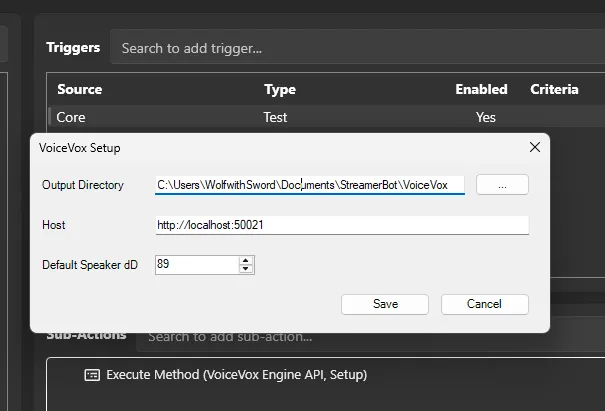
VoiceVox SetupAction and run its test trigger to setup default values for the host, output directory, and default speaker id.
Troubleshooting
- Actions fail immediately or nothing happens - confirm VoiceVox is actually running before triggering anything.
- Nothing works still and the setup doesn’t open - open the Execute C# Code Sub-Action in
VoiceVox Codeand click Find Refs once, then try again.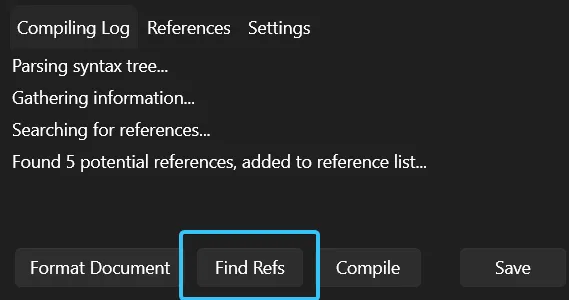
- Need help? Reach out on Discord or Twitter.
Reviews
Loading reviews…
Checking your download history…
Sign in to leave a review.
Download this extension to leave a review.
Leave a review
Share your experience with this extension.