GoAffPro Extension
Connect your GoAffPro affiliate stores in Streamer.bot and listen for new orders in real time.
What it does
Connects to your GoAffPro affiliate account and listens for new order events across every store tied to it - GamerSupps, UwU Market, Orchid Eight, Cheeky Soap, and however many more you’re enrolled in. Fires Streamer.bot triggers on new orders (syncs every 30s) so you can wire in alerts, overlays, and more for new orders.
I recommend in any action with triggers for orders received, you put it in a new blocking queue, so you do not overlap order events if they come in bulk.
Importing into Streamer.bot
- Download the extension file above.
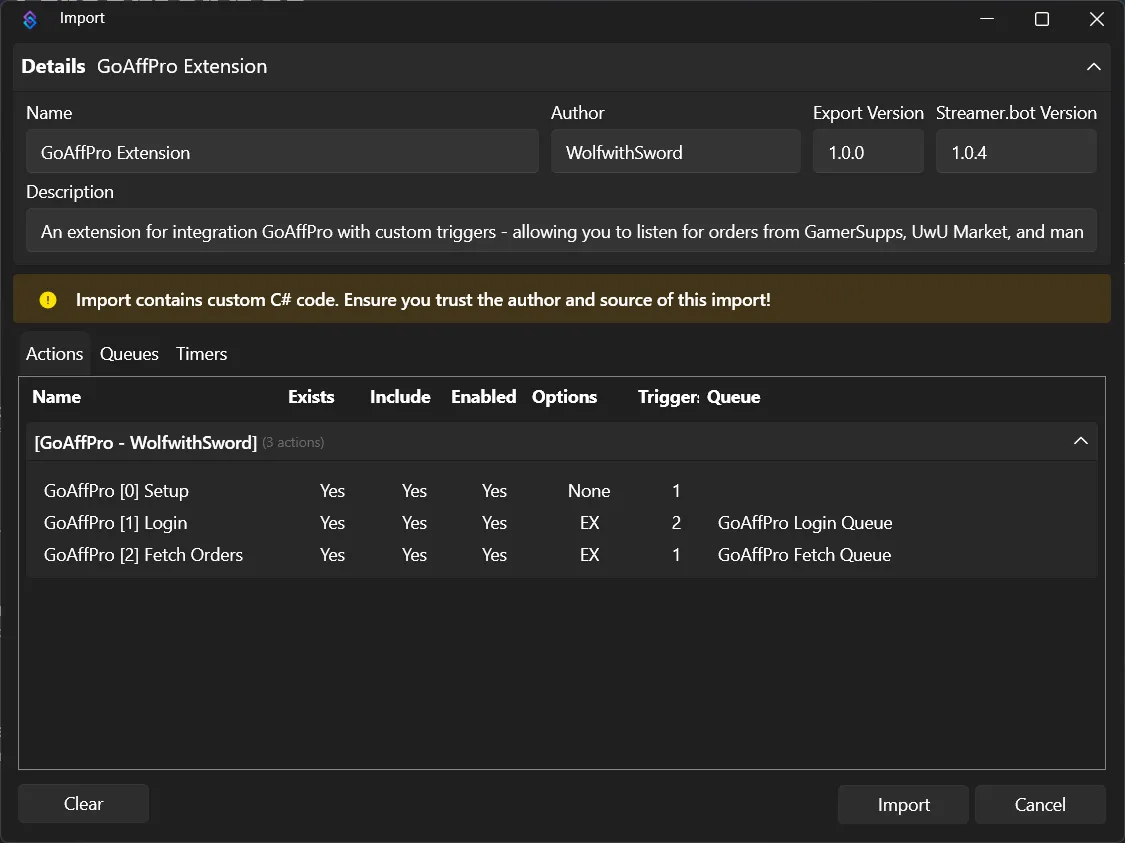
- In Streamer.bot, open the Import tab.
- Choose drag the downloaded file or paste its contents into the Import String area.
- Click Import - this adds the GoAffPro actions and triggers to your Streamer.bot.
First-time setup
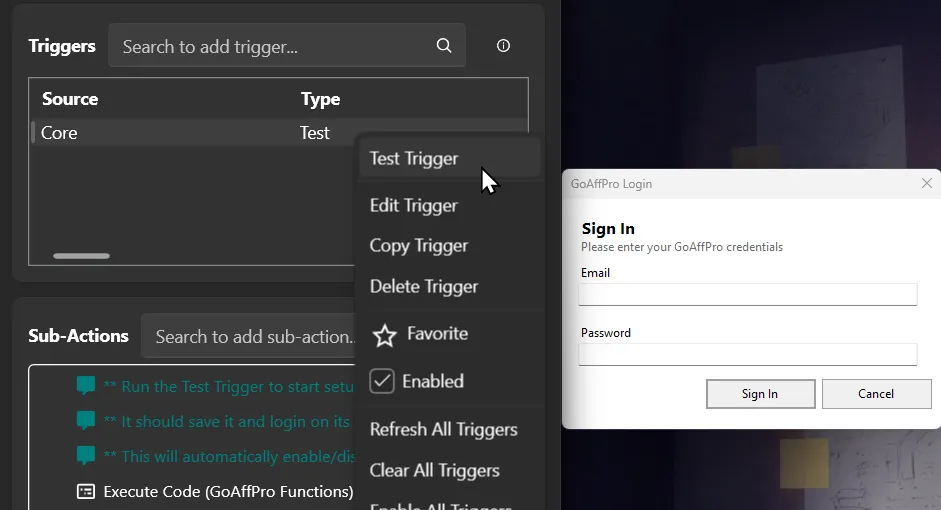
- After importing, find the [GoAffPro - WolfwithSword] group and GoAffPro [0] Setup action.
- Run the Test Trigger manually - a login popup will appear.
- Enter the email and password for your GoAffPro affiliate account and submit.
- Once authenticated, the extension automatically discovers every store connected to your
affiliate account and start listening for orders. You’ll also see the
Connectedtrigger fire once this succeeds.
You only need to do this once unless your credentials change - the extension handles re-authenticating periodically.
How To Use
After logging in, you can create a new action and search for triggers under Custom -> GoAffPro -> Orders for your stores or go with the Any Order Received option.
Triggers
Connected
Fires when the extension successfully authenticates and connects to your GoAffPro account.
No arguments.
Disconnected
Fires when the connection to GoAffPro is lost or closed after failing login.
No arguments.
Order Received
Fires whenever any connected store receives a new order.
Any Order Received will fire for an order from any store. <store_name> Order Received trigger will appear as a valid trigger if your affiliate account is partnered to them.
| Argument | Type | Description |
|---|---|---|
%site_id% | int | GoAffPro site/store ID the order belongs to |
%id% | int | Unique order ID |
%number% | string | Order number (e.g. #100000) |
%subtotal% | string/float | Order subtotal, before commission |
%total% | string/float | Order total |
%sub_id% | string | Sub Id |
%conversion_details% | object (unknown?) | Conversion tracking details, if any - not well documented yet |
%commission% | string/float | Commission amount earned on the order |
%currency% | string | Currency code (e.g. USD) |
%created_at% | string/datetime | Order timestamp |
%website% | string | Store’s website |
%store_name% | string | Name of the store the order came from (e.g. GamerSupps.GG, UwU Market) |
%status% | string | Order status (e.g. approved, new, may want to ignore others) |
%line_items.count% | int | Number of line items in the order |
Line items are flattened into individually indexed arguments rather than a single JSON blob -
# below is the zero-based item index, from 0 up to %line_items.count% - 1:
| Argument | Type | Description |
|---|---|---|
%line_items[#].id% | int | Line item ID |
%line_items[#].product_id% | int | Product ID |
%line_items[#].variation_id% | int | Product variation ID |
%line_items[#].sku% | string | SKU |
%line_items[#].vendor% | string | Vendor/store name for this item |
%line_items[#].name% | string | Product name |
%line_items[#].quantity% | int | Quantity ordered |
%line_items[#].refund_quantity% | int | Quantity refunded, if any |
%line_items[#].price% | string | Unit price |
%line_items[#].total_discount% | string/float | Total discount applied |
%line_items[#].total_price% | string/float | Total price for this item |
%line_items[#].total_tax% | string/float | Total tax for this item |
%line_items[#].gift_card_amount_used% | string | Gift card amount applied |
%line_items[#].gift_card_percentage% | string | Gift card percentage applied |
%line_items[#].total% | string/float | Item total |
%line_items[#].exclude_discounts% | bool | Whether discounts are excluded |
%line_items[#].commission% | string/float | Commission earned on this item |
%line_items[#].affiliate_id% | int | Your affiliate ID |
%line_items[#].commission_value% | string | Commission rate/value |
%line_items[#].commission_type% | string | Commission type (e.g. percentage) |
For example, with two line items you’d have %line_items[0].name% and %line_items[1].name%
(and so on), with %line_items.count% equal to 2.
This trigger also carries the basic Streamer.bot custom trigger arguments (%triggerId%,
%actionName%, %actionQueuedAt%, etc.) alongside the ones above.
Stores
The list of compatible stores is incredibly long and mostly unknown, but this should work for every one associated with your GoAffPro account. So far, I have confirmed the following:
- GamerSupps, UwU Market, Orchid Eight, KatDragonz, Cheeky Soap, Advanced GG, Rogue Energy, Saucy Biz, GFuel, Natura Pine, Madrinas, Otaku Lamps, V1 Tech
Troubleshooting
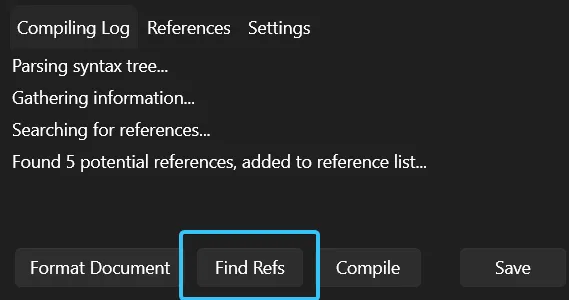
- Login popup doesn’t appear or fails - make sure it isn’t a small window behind others on your desktop. Elsewise, open the Execute C# Code Sub-Action in the Setup action, and click Find Refs once, then try again.
- Connected fires but no orders come in - double check the store is actually enrolled and active on your GoAffPro affiliate account. It polls for new orders every 30s once connected.
- Need help? Reach out on Discord or Twitter.
Reviews
Loading reviews…
Checking your download history…
Sign in to leave a review.
Download this extension to leave a review.
Leave a review
Share your experience with this extension.